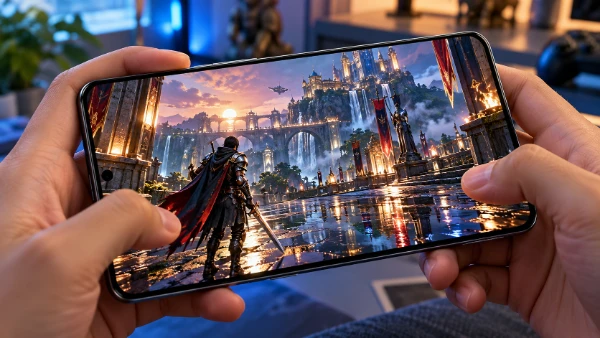
Prince of Persia: The Lost Crown arrived on iOS and Android on 14 April 2025, bringing Sargon’s full original adventure to phones and tablets rather than offering a shortened companion edition. By 2026, the mobile release has become a practical way to play the Metroidvania-style action game away from a television, with offline play, controller support and a touch interface created specifically for smaller screens. Its most important changes are not to the story, map or combat system, but to the way players control Sargon and manage demanding fights and acrobatic sections. The following guide explains how the touch layout works, which assistance options are genuinely useful, and what feels different when the same game is played on a mobile device instead of a console.
How Touch Controls Work on Phones and Tablets
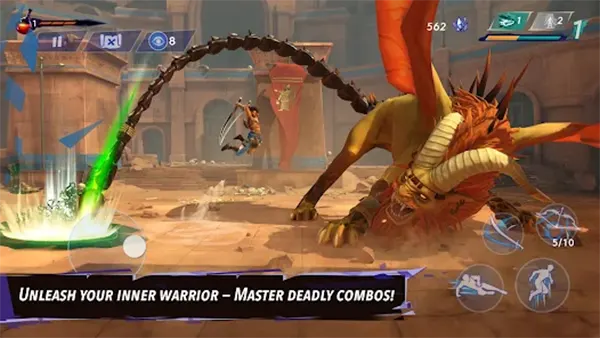
The mobile edition replaces a fixed controller layout with virtual buttons placed directly over the game screen. Movement is handled on the left, while attacks, parries, jumps, dashes and Time Powers are grouped on the right. This gives immediate access to Sargon’s main actions, but it also means that several commands must share limited screen space. Ubisoft addressed this by allowing the touch layout to be customised rather than forcing every player to use one arrangement. Buttons can be moved, resized and reshaped, which is especially helpful on devices with unusual screen proportions, rounded corners or camera cut-outs.
Touch controls are fully usable for ordinary exploration and early combat, but The Lost Crown often asks for several actions in quick succession. A difficult sequence may involve a jump, air dash, wall movement and another jump within a few seconds, while later battles combine attacks, dodges, parries and special abilities. Physical buttons remain easier to identify without looking, whereas virtual controls depend more heavily on muscle memory. For that reason, the best mobile layout is not necessarily the neatest one. Important buttons should be placed where the thumbs naturally rest, even if the finished arrangement looks uneven.
The mobile interface also adapts to screen ratios from 16:9 to 20:9, so the game can use the width of modern phones without simply stretching the image. On recent hardware, it can run at up to 60 frames per second, which matters because smoother motion makes enemy attacks and moving hazards easier to read. Performance still depends on the device, graphics settings and heat generated during longer sessions. Players using older or mid-range phones may find that a stable lower setting feels better than chasing the highest visual quality while the frame rate changes during boss fights.
Recommended Touch Settings for Comfortable Play
A sensible starting point is to enlarge the jump, attack, parry and dash buttons before changing anything else. These four commands are used constantly and should be reachable without stretching the right thumb. Less frequent actions, such as opening the map or triggering a situational ability, can sit closer to the edge of the screen. It is also worth leaving a small gap between parry and attack. When the buttons overlap or sit too close together, an intended defensive move can easily become a normal strike, which is particularly costly against attacks that must be countered at the correct moment.
Opacity and button size should be balanced rather than pushed to extremes. Very small controls preserve more of the artwork but are harder to hit during fast movement. Very large controls are reliable, yet they can cover enemies, traps or visual cues near Sargon. A good method is to adjust one group at a time, test it in a safe area and then make small corrections. The Haven and other calmer locations are useful for checking basic reach, while the practice area lets players repeat attacks and defensive timing without losing progress.
Players who alternate between touch input and an external controller should keep both arrangements familiar. The game supports external controllers, so a phone can provide an experience much closer to the console release when paired with a compatible pad. Touch remains useful for short sessions or travel, while a controller is usually more comfortable for long boss attempts and precise movement challenges. The important point is that using a controller does not remove the mobile-specific settings. Assistance features, difficulty adjustments and screen options can still be changed, allowing each input method to be matched to the player’s preferred level of challenge.
Assist Options and the Best Ways to Use Them
The mobile release includes automatic helpers that reduce the number of rapid inputs required on a touchscreen. Auto-Potion uses a healing potion when Sargon’s health becomes low, preventing a missed tap from ending a long fight. Auto-Parry can deflect incoming attacks while the character is not moving, which makes defensive timing more forgiving without turning every encounter into an automatic victory. Auto-Hit activates attacks when Sargon moves close to an enemy, helping players who find it awkward to control direction and attack buttons at the same time. Each option can be enabled separately, so assistance does not have to be treated as an all-or-nothing setting.
Other tools deal with survival and game speed. The optional shield provides protection from one hit, giving the player a small margin for error during a demanding encounter. Time Lord can slow the action to 75 per cent of normal speed, making attack signals, traps and moving objects easier to read. This is more flexible than simply lowering enemy damage because it changes the pace at which decisions must be made. A player can keep the intended danger of a boss battle while gaining a little more time to recognise patterns and choose the correct response.
Mobile players can choose from three starting configurations: an arrangement close to the original high-definition experience, a setup tailored for mobile play and a more casual option with additional help. These are starting points rather than permanent modes. Individual features can be switched on or off later, which is useful because the ideal setup may change across the game. Someone may prefer standard combat during exploration, Auto-Potion for a difficult boss and slower time for a particularly demanding sequence of jumps. The game therefore allows assistance to solve a specific problem instead of permanently reducing every challenge.
Guided Mode, Movement Help and Fair Difficulty
Guided Mode addresses navigation rather than combat. When enabled, it adds icons that indicate objectives and show which routes are available or blocked by an ability that has not yet been obtained. This is valuable on Mount Qaf, where paths connect across several regions and progression often depends on returning to an earlier area with a new Time Power. The mode does not reveal every secret or solve puzzles automatically. It mainly reduces the chance of wandering for a long period without understanding which direction can currently lead to progress.
The game also retains broader accessibility features from the original release. The Eye of the Wanderer allows screenshots to be attached to the map, creating a visual reminder of a locked door, unreachable item or suspicious room. Optional portals can help players move past selected difficult jumping sections, and interactive objects can receive stronger highlighting. These tools are useful for different reasons: one supports memory, another removes a physical execution barrier, and another makes important details easier to see. They can be used independently, so enabling clearer guidance does not require automatic combat.
Assistance works best when it removes frustration without erasing the part of the game a player enjoys. Auto-Parry may suit someone who likes exploration but struggles with reaction timing, while Guided Mode may help a player who enjoys combat but dislikes getting lost. Slower time can also serve as a learning tool: after practising an enemy pattern at 75 per cent speed, the player may later return to normal speed with a better understanding of the attack sequence. There is no penalty for changing these settings, and using them does not make a completed section less legitimate.
Mobile and Console Versions Compared in 2026
The central experience is substantially the same. Ubisoft states that the mobile edition contains 100 per cent of the content from the original release, including the main story, Mount Qaf, core abilities, enemies, bosses, side activities and progression systems. It is not a simplified remake built around short daily sessions. The combat still relies on fast movement, combinations of attacks, well-timed defence and Time Powers, while the interconnected map still encourages returning to earlier locations after gaining new abilities. Players familiar with the console release will therefore recognise the same structure and major encounters.
The main differences concern input, interface and convenience. Consoles are designed around a physical controller and a large display, so button prompts and menus have more room and precise actions are easier to perform by feel. Mobile devices use a redesigned interface, custom touch controls and extra automation to compensate for the lack of physical buttons. They also support offline play and external controllers, making the mobile edition flexible enough for both quick sessions and longer play at home. On supported recent devices, the target of up to 60 frames per second helps preserve the speed of the original combat.
The purchase model is also different. The mobile app can be downloaded and tried for free, after which the full game is unlocked through a single in-app purchase; progress from the trial is retained. Console editions are normally purchased before play. The phrase “100 per cent of the original release” refers to the base content available when the game first launched, so it should not automatically be read as a promise that every later paid add-on from other systems is included. Players interested in a particular expansion or cosmetic pack should check the current store listing for their device before buying.
Which Version Offers the Better Experience?
The console edition remains the easier recommendation for players who want the most consistent controls without adjusting a screen layout. A physical pad, larger image and fixed hardware environment make long sessions comfortable, especially during late-game fights and complex movement sequences. It is also the more natural choice for anyone who already owns the game and does not need a portable copy. The mobile edition cannot completely reproduce the feel of physical buttons when played only through touch, even though its customisation and automatic helpers reduce the gap.
The mobile edition is stronger for portability and choice. It can be played offline, supports touch or a controller and allows assistance to be adjusted in far greater detail than a basic easy mode. This makes it suitable for commuting, travel or players who share a television and cannot always use a console. It is also a practical entry point because the opening section can be tested before the full game is purchased. Device performance should still be considered: the experience is best on a recent phone or tablet with enough storage, memory and cooling for a large action game.
In 2026, Prince of Persia: The Lost Crown Mobile is best understood as a complete conversion with thoughtful control changes rather than a smaller edition. Its touch interface requires a short setup period, but movable buttons, several play-style configurations and targeted helpers make the demanding action manageable on a handheld screen. The console release still has an advantage in immediate precision, while mobile offers more freedom over where and how the game is played. Choosing between them depends less on missing content and more on whether the player values physical controls, portability or adjustable assistance most.